Congratulations on your admission to the WashU Sever Institute Spring or Summer Connect for Engineering program at WashU! We are excited to welcome you to campus.
Focused on preparing students for either WashU’s MEM or MISM graduate degrees, this one-semester (16-week) or 6-week residential summer program allows admitted students to take three (for spring) or two (for summer) 3-credit graduate-level courses. These courses count toward the MEM or MISM degree program requirements. As an incoming international student, you need an I-20 to apply for an F-1 visa for study at WashU. Below are the steps to apply for this document from the Office for International Students and Scholars (OISS).
What is an I-20?
An I-20 is a form issued by OISS for students to obtain F-1 student immigration status.
You will need an I-20 to:
When you receive your I-20, review it for accuracy. If you see any errors, notify OISS right away. You must print, sign (physically in ink) and date the form before your visa interview and/or arrival at a U.S. port of entry. Visit our Planning for U.S. Arrival webpage for more details on next steps.
Apply for a I-20
Step 1:
Follow the instructions sent to you to create an account in MyOISS. You will receive an invitation email with instructions to login to MyOISS with a subject line starting with “Welcome to MyOISS!” The email will come from oiss@wustl.edu. Check both the email address that you used on your application for admission to WashU and your WashU email if issued.
When your WashU email address is issued, you will receive notification to the email address that you used on your application for admission to WashU. Please activate your WashU key and email right away. If you have trouble activating your WashU Key or two-factor authentication, reach out to IT Help.
Step 2:
Complete the Immigration Document Request. You will fill out questionnaires and upload required documents to your MyOISS account as shown below. If you are transferring a SEVIS record from another institution, you must indicate this in the MyOISS request.
1. Passport
Copy of the biographical page (with your photo) in your passport. If you are a dual-citizen, submit a copy of the passport you will use when applying for a U.S. visa stamp.
2. Proof of admission
Copy of your admission email to the Spring or Summer Connect program.
3. Financial documentation
You must show proof of funding for the full Spring or Summer Connect program, including cost of living. Find approved (and unapproved) funding documents and requirements on our Financial Documentation page.
You must submit the Affidavit of Financial Support along with proof of funding. You will not provide proof of funding for one year; instead, you will provide proof of funding for the entire program.
U.S. government restrictions on acceptable funding evidence for an I-20: U.S. OFAC financial sanctions prohibit OISS from accepting financial statements from financial institutions of countries subject to applicable sanctions, including countries subject to comprehensive OFAC sanctions (currently Cuba, Iran, North Korea, Syria).
Step 3:
Access your new immigration document. When we issue your I-20, we will share it with you in the MyOISS platform. You will receive an email from oiss@wustl.edu with details on how to retrieve your I-20 and next steps.
It is essential that you read this information and follow next steps.
OISS processing time is 3 business days from the day your I-20 request is submitted to OISS. However, if required documentation/information is missing or if your record requires additional checks, processing may be delayed.
Visa Information: If you have a currently valid visa that matches your status, check if the SEVIS ID number matches your new WashU immigration document. If the SEVIS ID number does not match, we recommend that you apply for a new visa when you will re-enter the U.S.
Transfer a SEVIS record to WashU
Transferring your F-1 status to Washington University in St. Louis from another school where your SEVIS record is currently active requires a few steps. Read the information linked below to transfer your SEVIS record to WashU.
SEVIS ID Number
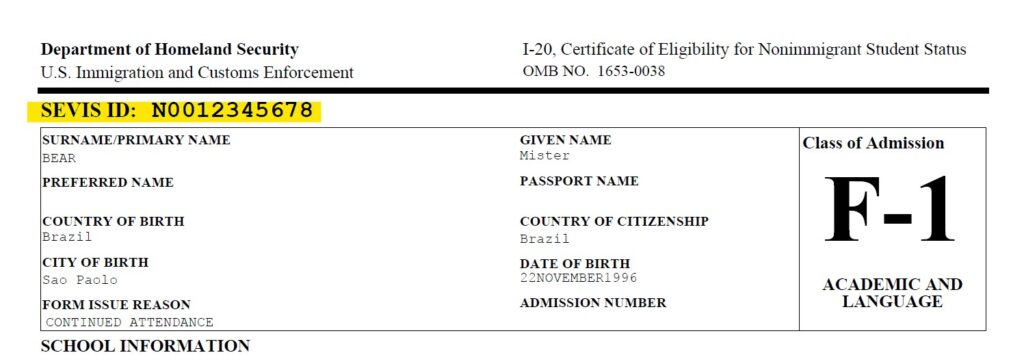
The SEVIS ID number is located in the upper left corner of your Form I-20. It begins with the letter “N” followed by a series of numbers (e.g., N0012345678). This is unique to you and is used by the U.S. government to track and manage your immigration record in the Student and Exchange Visitor Information System (SEVIS) throughout your stay in the United States.
Learn more about your SEVIS ID number including why it is important for the number on your immigration document to match the “Annotation” on your visa.
See example I-20 with SEVIS ID number highlighted:
Apply for a visa stamp
Once you are admitted and receive your I-20 for F-1 status, you must apply for a visa stamp to enter the U.S.
We also offer opportunities for you to join a webinar created to assist you in your visa application process.
Visa delays
Processing times and delays vary by U.S. Consulate/Embassy. Many students receive their visas within a couple of weeks of a visa interview/appointment. However, anyone applying for a visa may be subject to an administrative processing delay or background check that could take several weeks.
Review the information on the Department of State website for the embassy in your home country to determine standard processing times. If an administrative delay or background check postpones your intended arrival, contact OISS.