In order to be legally paid for work in the United States, you must have a social security number (SSN). Learn how to apply for an SSN.
Steps to apply for an SSN
Step 1: Gather required documents
- F-1/F-2 immigration status
-
Visa/Employment Type Eligible? Required Documentation F-1 on-campus employment
wage earnersYes – after completing immigration check-in with OISS and receiving “SEVIS registration complete” email from oiss@wustl.edu
Recommended within 30 days of employment start datePassport
Most recent I-94 record
Current, valid I-20
On-Campus Employment Verification Letter: must be on university letterhead and signed by your supervisor or an authorized HR representative; must include the employment details listed in the OISS template
F-1 SSN Letter issued by OISS: confirms your F-1 status and eligibility for on-campus employment; submit the SSN Letter request in MyOISS to receive DSO verificationF-1 on-campus stipend roles Not eligible F-1 CPT Yes – up to 30 days before CPT begins
Not eligible after employment has endedI-20 with CPT endorsement from OISS: submit the CPT Authorization request in MyOISS
Passport
Most recent I-94 recordF-1 OPT Yes – from start date listed on EAD
Not eligible after employment has endedI-20 with OPT endorsement from OISS: submit the Reprint I-20 request in MyOISS
Passport
Most recent I-94 record
EAD CardF-1 no employment Not eligible F-2 dependents Not eligible Table to determine your eligibility to apply for an SSN and required documents.
- J-1/J-2 immigration status
-
Visa/Employment Type Eligible? Required Documentation J-1 Students who are stipend recipients or on-campus employment wage earners Yes – after completing immigration check-in with OISS and receiving “SEVIS registration complete” email from oiss@wustl.edu Passport
Most recent I-94 record
Current, valid DS-2019
On-Campus Employment Verification Letter: must be on university letterhead and signed by your supervisor or an authorized HR representative; must include the employment details listed in the OISS template
Social Security letter: submit the Social Security letter request in MyOISSJ-1 Academic Training (AT) Yes – on or after program start date on DS-2019 and after completion of immigration check in with OISS DS- 2019 with AT endorsement from OISS: submit the J-1 Academic Training request in MyOISS
Social Security letter: submit the Social Security letter request in MyOISS
Passport
Most recent I-94 recordJ-1 Research Scholars, Professors, Short-Term Scholars in paid employment roles Yes – on or after program start date on DS-2019 and 10 days after completion of immigration check in with OISS DS-2019
Passport
Most recent I-94 record
Offer letter or proof of employment from sponsoring department with exact dates of employmentJ-1 Student Interns Yes – on or after program start date on DS-2019 and 10 days after completion of immigration check in with OISS DS-2019
Passport
Most recent I-94 record
Host invitation letter from sponsoring departmentJ-2 dependents Yes – if J-2 has EAD and if paid a wage instead of a stipend EAD card
DS-2019
Passport
Most recent I-94 recordTable to determine your eligibility to apply for an SSN and required documents.
- Employee immigration status (H-1B, TN, E-3, O-1)
-
Visa/Employment Type Eligible? Required Documentation H-1B, TN, E-3 & O-1 visa holders Yes – on or after the start date on Form I-797 Form I-797 Approval Notice
Passport
Most recent I-94 record
Offer letter or contract from hiring departmentTable to determine your eligibility to apply for an SSN and required documents.
Step 2: Complete the Online SSN Application on the SSA website
Begin the process online to apply for a new Social Security card online.
After submitting the online application, be sure to print, annotate or take a screen shot of your confirmation number (O number). Next, you must complete the application process by visiting your local Social Security Administration (SSA) office with your confirmation number (O number) and required documentation within 45 calendar days.
Step 3: Go to the Social Security Administration (SSA) office in person
After you complete the online SSN application, you will be prompted to schedule an appointment with your local SSA office. Go to the Social Security Office Locator and enter your zip code to find the closest office location.
Even if you do not see an appointment available within the next 45 days, schedule the next available appointment. Be sure to save the appointment confirmation because you may have to present it to your employer in order to avoid pause in employment.
If you are a WashU employee, you must email WashU HR at HROperations@wustl.edu to let them know that you are in the process of applying for an SSN. Doing so will ensure that you are not placed on a short work break.
When going to your SSA appointment, be sure to bring hard copies of your required documents and your confirmation number (O number) assigned during the online application.
Step 4: Wait for your Social Security card to arrive
Once your application for an SSN has been approved by the SSA, the SSA will send a Social Security card to the address listed on your application form. The usual processing time is 2 – 4 weeks. If additional security procedures are necessary, processing times may range from 4 – 8 weeks. The SSA will not issue a number in advance of the card being mailed.
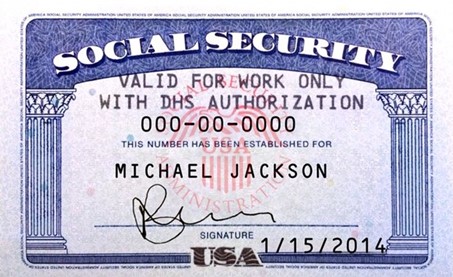
F and J students will most likely receive a Social Security card that has the notation: “Valid for work only with DHS Authorization.” SSA issues this type of card to those in F or J immigration status because the card alone does not authorize employment.
After you receive your SSN, it’s best not to carry the card with you on a daily basis. Instead, memorize the number, and keep the card in a safe place with your other important documents. Don’t lose your card!
If you work for WashU, update your Workday record to add your SSN. Also notify FNIS Support at fnis@wustl.edu (do not include the SSN in the email).
ITIN
An Individual Taxpayer Identification Number (ITIN) is a tax processing number the Internal Revenue Service (IRS) issues to an individual who needs to report income but is not eligible to obtain an SSN from the SSA. If you are NOT eligible to apply for an SSN, please see the instructions to apply for an Individual Taxpayer Identification Number (ITIN). If you have an SSN, you do NOT need an ITIN.
Most common categories of international students and scholars who are not eligible for an SSN include F-1 graduate students and J-1 student interns who receive a stipend from WashU. Be sure to check with your department to learn if you are paid through a stipend or a wage before beginning the SSN or ITIN application process.
SSN refusal letter to apply for a Missouri driver’s license
Students who only need an SSN refusal letter to apply for a Missouri Driver’s License, ITIN, or other purpose, must go to a local SSA office to apply for a SSN Refusal Letter (Form SSA-L676). When you go to the SSA office, take all of these documents:
- Completed Form SS-5 (as much as possible) and handwrite “Request for SSA-L676” at the top of the form
- Passport (your original and 1 copy of the bio page)
- Visa page (your original and 1 copy)
- Most recent I-94 (1 copy)
- Status document, such as I-20 or DS-2019 (your original and 1 copy)
Note that each SSA office has its own procedures for SSA-L676: some will issue it while you are there, and some will mail it to you. If you have questions, contact the SSA at 1-800-772-1213.
Useful Resources
Social Security Numbers for Non-Citizens (PDF) from SSA
International Students and Social Security Numbers (PDF) from SSA
Obtaining a Social Security Number from Study in the States
Replace your Social Security card – if it is lost or stolen