The Foreign National Information System (FNIS) collects data from foreign national (FN) employees so that Payroll Services can correctly tax their WashU paychecks and generate applicable tax documents. Without a fully updated FNIS record, FN paychecks may be taxed incorrectly.
FNIS process
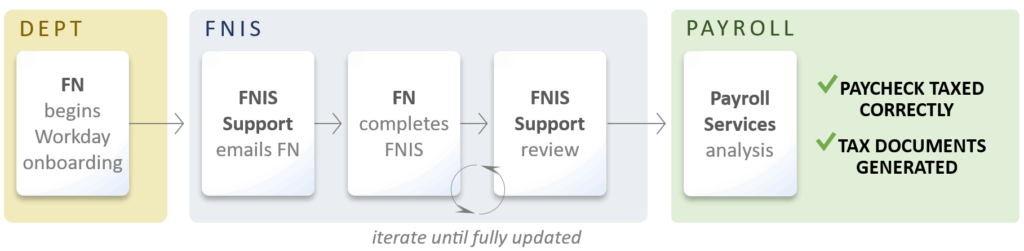
Within about 1 week of hire, FNIS Support notifies newly hired FNs to complete FNIS and provides guidance for entering data into FNIS.
Once a FNIS record is submitted, FNIS Support reviews the data and contacts the FN with any questions. FNIS Support usually reviews initial submissions within 2 business days. FNIS Support communicates with FNs until their FNIS record is fully updated.
After a FNIS record is fully updated, Payroll Services analyzes the data. Analysis results (including tax forms) are uploaded into FNIS only if the FN has consented to receive forms in FNIS. The Payroll Services review process can take up to a month.
FNs are asked to enter the following information into FNIS:
- Demographic data (legal name, D.O.B., WashU position, etc.)
- Passport data (country of citizenship, passport expiration, etc.)
- Taxation data (country of tax residence, if they want to claim tax treaty benefits, etc.)
- Immigration status data (current status, travel in/out of the U.S., status changes)
The services that FNIS Support provides are as follows:
- Notify newly hired FNs to complete FNIS and submit copies of any documentation necessary to verify data submitted in FNIS.
- Review FNIS submissions and provide guidance to fully update FNIS. This does not include “specific tax advice” in the FNIS form, or questions about Payroll Services’ analyses and tax documents.
- Provide informational guidance for filing taxes and applying for ITINs. This does not include “specific tax advice” for filing a tax return.
U.S. taxpayer IDs
FNs earning a wage (hourly or salary) need to apply for an SSN. The FN can submit the application after they:
- have been in the U.S. for 10 days and
- check in with OISS.
We recommend FNs submit an SSN application to the Social Security Administration (SSA) within 30 days of starting employment.
Depending on SSA availability, it may take several weeks to schedule an SSN application appointment. If the FN begins receiving alerts to add their SSN into Workday, they should notify HR Ops at HROperations@wustl.edu of their upcoming appointment. Otherwise, they may be put on a short work break.
Once an FN receives an SSN, they should:
- update their Workday record, which may include uploading a copy of their SSN card and
- notify FNIS Support at fnis@wustl.edu (do not include the SSN in the email).
Note: FNs who are eligible for tax treaty benefits (such as reduced tax withholding) can only receive those benefits after receiving their SSN. If WashU issues their paycheck before they receive an SSN, the FN can contact International Payroll Services at CFU-InternationalPayroll@email.wustl.edu to determine what remedy is available (refund in next paycheck, refund when filing taxes, etc.).
Note: FNs who receive an SSN after receiving an ITIN must discontinue using the ITIN. Also, they must notify the IRS to combine records under their new SSN.
FNs must apply for an ITIN if they are only receiving a stipend (and not a wage).* We recommend FNs submit an ITIN application as soon as possible after they have checked in with OISS. It can take up to 11 weeks for the IRS to process an application. Direct questions to fnis@wustl.edu.
*J-1 Research Scholars only receiving a stipend should apply for an SSN.
Once an FN receives an ITIN, they should:
- update their Workday record, which may include uploading a copy of their ITIN letter and
- notify FNIS Support at fnis@wustl.edu (do not include the ITIN in the email).
Note: FNs who are eligible for tax treaty benefits (such as reduced tax withholding) can only receive those benefits after receiving their ITIN. If WashU issues their paycheck before they receive an ITIN, the FN can contact International Payroll Services CFU-InternationalPayroll@email.wustl.edu to determine what remedy is available (refund in next paycheck, refund when filing taxes, etc.).
Workday work authorization data
The Workday Visas table (under Personal > IDs) indicates a FN’s WashU work authorization information. The I-9 team adds this data for all wage earners (hourly or salary). FNIS Support adds this data for all stipend-only recipients.

- Wage earner updates – FNs should schedule an appointment with the I-9 team at the Danforth Campus or Medical Campus to reverify their I-9 paperwork. Direct questions to DanforthCampusI9@wustl.edu or MedCampusI9@wustl.edu.
- Stipend-only recipient updates – FNs should contact FNIS Support at fnis@wustl.edu for assistance.
Workday RPT1115 lists resident aliens and non-resident aliens, their specific visa types and associated dates as listed in the Workday Visas table. Use the report to ensure no one works beyond their work authorization expiration date. We recommend departments establish a process to review this report at least 2 months prior to your FN employees’ expiration dates and communicate with the FN employees to avoid any work authorization issues.
When WashU shortens a wage earner’s work authorization (such as shortening the I-20 program end date for early graduation), the Workday Visas table does not reflect the new expiration date. This is because the FN’s I-9 paperwork does not need to be reverified for this information. Therefore, it is critical that departments terminate Workday records in a timely manner. This timely termination will ensure that any other WashU position the FN begins will trigger a new I-9 process to verify their work authorization at WashU.
However, when WashU shortens a stipend-only recipient’s work authorization, FNIS Support updates the Workday Visas table with this data. Nevertheless, departments must still terminate Workday records in a timely manner to ensure a new I-9 process is triggered when necessary.
If a FN will be paid while outside the U.S., notify International Payroll Services at CFU-InternationalPayroll@email.wustl.edu and Sara Wright at sara.wright@wustl.edu. This notification is essential to ensure that:
- the FN may be paid while outside the U.S. and
- all U.S. tax laws are followed correctly for those payments.
Tax questions
FNIS Support can provide general information about U.S. taxes, including the information on the following WashU and OISS resource pages:
- Taxes in the U.S.
- International Wage Earners vs. Stipend Recipients
- Tax Withholdings
- Quarterly Estimated Tax Payments
However, FNIS Support cannot provide specific tax advice, which includes some portions of the FNIS form and any questions pertaining to Form W-4 elections, benefit selection and individual tax-related questions. For specific tax advice, we encourage FNs to speak with a tax professional.
WashU students and scholars who are non-resident aliens can use Sprintax Returns to help them prepare and submit their tax returns. Resident aliens will need to refer to other resources, such as TurboTax. For information about using Sprintax Returns and upcoming tax webinars, FNs can refer to these resource pages:
Direct questions about WashU-generated tax forms to International Payroll Services at CFU-InternationalPayroll@email.wustl.edu. For general information about these forms, FNs can refer to the Tax Documents resource page, which includes information about tax documents that appears in FNIS and Workday.
Questions?
Contact FNIS Support at fnis@wustl.edu for assistance.